Deferred Rendering
In this tutorial we replace Tutorial 2’s single-pass lighting with deferred rendering — a two-pass technique that keeps lighting cost independent of scene complexity:
- Allocate the GBuffer: three off-screen textures (albedo, normal, position)
- Geometry pass: rasterize the scene and write surface data into the GBuffer
- Lighting pass: draw a full-screen quad and compute lighting once per pixel, reading from the GBuffer
Prerequisite: Make sure you have completed Tutorial 2 — Sample Object.
⚙️ Setting up the project
In MTMetalTutorialsApp.swift set MT3ContentView() and run:
@main
struct MetalTutorialsApp: App {
    var body: some Scene {
        WindowGroup {
            MT3ContentView()
        }
    }
}
🔗 Metal API in this tutorial
| Object | Docs | Scope | Role |
|---|---|---|---|
MTLTextureDescriptor |
↗ | Creation only | Describes texture properties before allocating |
MTLTexture |
↗ | Scene/frame lifetime | GPU image allocation (color, depth, …) |
MTLRenderPassColorAttachmentDescriptor |
↗ | Per pass | Wires a texture + load/store actions into a pass |
MTLRenderPassDescriptor |
↗ | Per pass | Collection of all attachments for one render pass |
| Multiple Render Targets (MRT) | ↗ | Pipeline setup | Write to N color textures in one fragment shader invocation |
💡 New concepts in this tutorial
In Tutorial 2 we shaded each fragment immediately as the geometry was rasterized — this is forward rendering. The problem: every fragment runs the full lighting computation, even fragments that will later be overdrawn by closer geometry.
Deferred rendering splits the work into two passes:
- Geometry pass (GBuffer pass) — rasterize the scene and write surface data (albedo, normal, position) into off-screen textures called the GBuffer.
- Lighting pass — draw a full-screen quad and compute lighting for each pixel once, reading from the GBuffer textures.
This decouples the cost of geometry from the cost of lighting.
flowchart LR
    Scene["Scene\n(meshes)"] --> GP["Geometry Pass\ngbuffer_fragment"]
    GP --> A["albedoSpecular\nbgra8Unorm"]
    GP --> N["normal\nrgba16Float"]
    GP --> P["position\nrgba16Float"]
    A & N & P --> LP["Lighting Pass\ndeferred_lighting_fragment"]
    LP --> D["Drawable\n(screen)"]
📁 Files
| File | Purpose |
|---|---|
MT3ContentView.swift |
SwiftUI entry point |
MT3DeferredMetalView.swift |
UIViewRepresentable |
MT3DeferredRenderer.swift |
Two-pass renderer (GBuffer + lighting) |
MT3DeferredRendering.metal |
GBuffer fragment + display vertex + lighting fragment |
MT3GBuffer.h |
Render target index enum |
MT3Uniforms.h |
Shared uniform structs,MT3BasicVertex, buffer index enum |
The GBuffer
Let’s start by allocating the GBuffer. These three off-screen textures accumulate per-pixel surface data during the geometry pass, then hand everything to the lighting pass in one step.
The GBuffer is a set of textures that store per-pixel surface properties. Tutorial 3 uses three:
| Texture | Format | Contents |
|---|---|---|
albedoSpecular |
bgra8Unorm |
base color (white for now) |
normal |
rgba16Float |
view-space normal |
position |
rgba16Float |
view-space position |
MTLTextureandMTLTextureDescriptor— GPU image allocations. AMTLTextureis a typed block of GPU memory holding image data. You configure it with aMTLTextureDescriptor(pixel format, dimensions, mip levels, usage flags, storage mode) and then calldevice.makeTexture(descriptor:). Theusageflag is critical: a texture used as a render target and sampled in a later shader must have both.renderTargetand.shaderReadbits set — setting only one or the other causes a Metal validation error. ThestorageModecontrols where the data lives:.privatemeans GPU-only (DRAM, no CPU access) — always use.privatefor off-screen render targets that the CPU never needs to read.
They are created (and recreated on resize) in mtkView(_:drawableSizeWillChange:):
let albedoDesc = MTLTextureDescriptor
    .texture2DDescriptor(pixelFormat: .bgra8Unorm,
                         width: Int(size.width), height: Int(size.height),
                         mipmapped: false)
albedoDesc.usage       = [.shaderRead, .renderTarget]   // written as RT, read as texture
albedoDesc.storageMode = .private                       // GPU-only memory

let gBufferDesc = MTLTextureDescriptor
    .texture2DDescriptor(pixelFormat: .rgba16Float, …)
gBufferDesc.usage       = [.shaderRead, .renderTarget]
gBufferDesc.storageMode = .private

_gBuffer = GBuffer(
    albedoSpecular: device.makeTexture(descriptor: albedoDesc)!,
    normal:         device.makeTexture(descriptor: gBufferDesc)!,
    position:       device.makeTexture(descriptor: gBufferDesc)!)
The render target indices are shared between Swift and Metal via a C enum:
// MT3GBuffer.h
typedef enum MT3RenderTargetIndices {
    MT3RenderTargetAlbedo   = 1,
    MT3RenderTargetNormal   = 2,
    MT3RenderTargetPosition = 3,
} MT3RenderTargetIndices;
The pipelines
Two separate pipelines are built whenever the size changes.
GBuffer pipeline
Multiple Render Targets (MRT) — Metal supports writing to up to 8 color attachments simultaneously from a single fragment shader invocation. Each attachment is an independently-formatted
MTLTexture. The pipeline descriptor lists the pixel format for each attachment index (colorAttachments[0..7].pixelFormat), and the render pass descriptor wires each index to a texture. In the Metal Shading Language, returning a struct with[[color(N)]]attributes routes each field to the corresponding attachment. MRT is the foundation of deferred rendering — without it, you’d need a separate pass per GBuffer texture.
Writes to three color attachments simultaneously (MRT):
_gBuffPipelineState = _buildPipeline(
    vertexFunction:   "MT3::vertex_main",
    fragmentFunction: "MT3::gbuffer_fragment",
    label: "GBufferPSO"
) { descriptor in
    descriptor.colorAttachments[MT3RenderTargetAlbedo].pixelFormat   = .bgra8Unorm
    descriptor.colorAttachments[MT3RenderTargetNormal].pixelFormat   = .rgba16Float
    descriptor.colorAttachments[MT3RenderTargetPosition].pixelFormat = .rgba16Float
    descriptor.depthAttachmentPixelFormat = metalView.depthStencilPixelFormat
}
💡 Lighting (display) pipeline
Reads from the GBuffer and writes to the final drawable:
_displayPipelineState = _buildPipeline(
    vertexFunction:   "MT3::display_vertex",
    fragmentFunction: "MT3::deferred_lighting_fragment",
    label: "DeferredLightingPSO"
) { descriptor in
    descriptor.colorAttachments[0].pixelFormat   = metalView.colorPixelFormat
    descriptor.depthAttachmentPixelFormat        = metalView.depthStencilPixelFormat
}
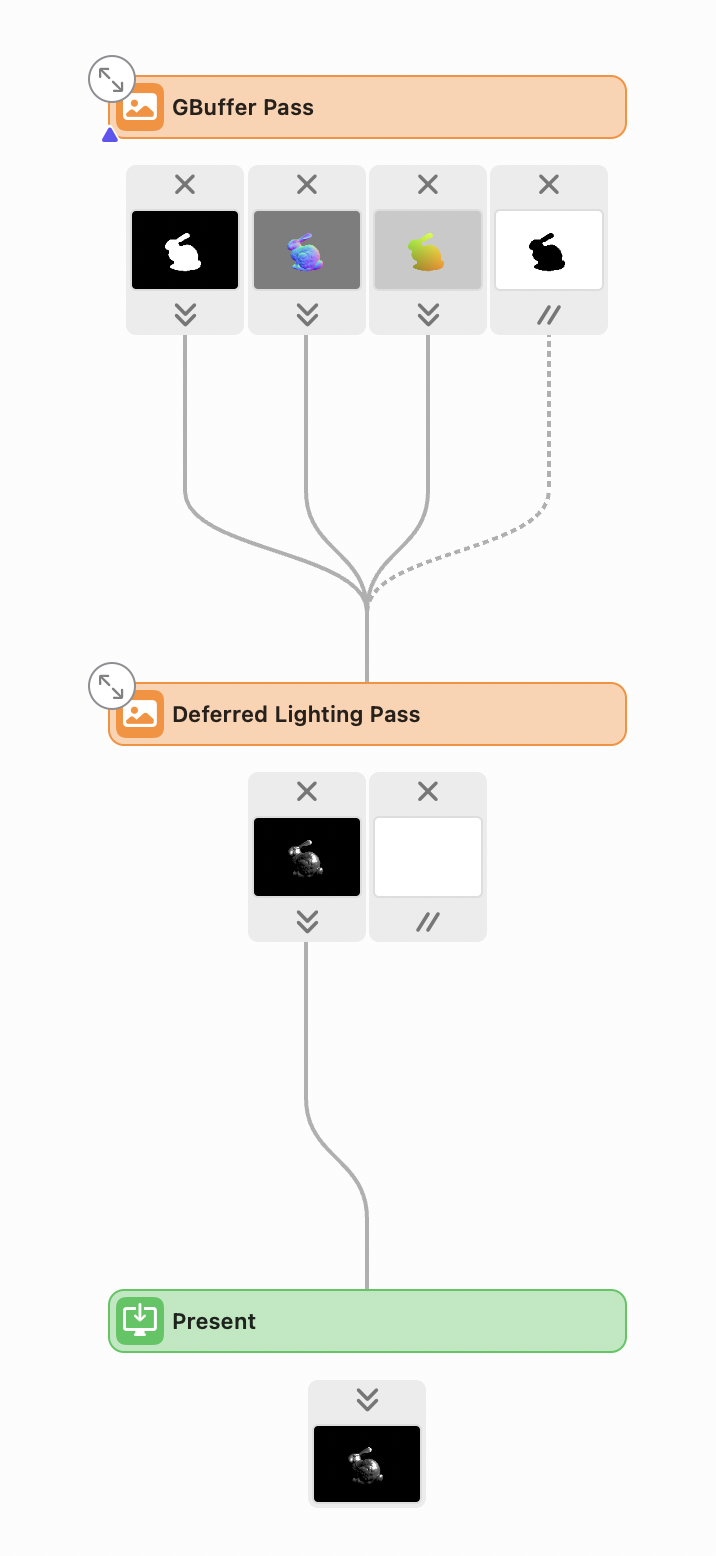
HdRestir uses the same distinction between named intermediate buffers and the pass that consumes them, but builds the sequence from declared inputs and outputs. The initial render-pipeline chapter shows the resulting sequence and compares it with this fixed Metal pass architecture.
The render function
Both passes share a single MTLCommandBuffer within draw(in:):
let commandBuffer = _commandQueue.makeCommandBuffer()!
1️⃣ Pass 1 — GBuffer
let gBufferPassDescriptor: MTLRenderPassDescriptor = {
    let desc = MTLRenderPassDescriptor()
    desc.colorAttachments[MT3RenderTargetAlbedo].texture     = _gBuffer.albedoSpecular
    desc.colorAttachments[MT3RenderTargetAlbedo].loadAction  = .clear
    desc.colorAttachments[MT3RenderTargetAlbedo].storeAction = .store

    desc.colorAttachments[MT3RenderTargetNormal].texture     = _gBuffer.normal
    desc.colorAttachments[MT3RenderTargetNormal].loadAction  = .clear
    desc.colorAttachments[MT3RenderTargetNormal].storeAction = .store

    desc.colorAttachments[MT3RenderTargetPosition].texture     = _gBuffer.position
    desc.colorAttachments[MT3RenderTargetPosition].storeAction = .store

    desc.depthAttachment.texture     = view.depthStencilTexture
    desc.depthAttachment.loadAction  = .clear
    desc.depthAttachment.storeAction = .dontCare   // depth not needed after this pass
    return desc
}()

_encodePass(into: commandBuffer, using: gBufferPassDescriptor, label: "GBuffer Pass") { enc in
    enc.setVertexBytes(&uniforms.0, …, index: 1)
    enc.setFragmentBytes(&uniforms.1, …, index: 1)
    enc.setViewport(_buildViewport())
    enc.setRenderPipelineState(_gBuffPipelineState)
    enc.setDepthStencilState(_depthStencilState)

    for mesh in _meshes {
        enc.setVertexBuffer(mesh.vertexBuffers.first!.buffer, …, index: 0)
        for submesh in mesh.submeshes {
            enc.drawIndexedPrimitives(…)
        }
    }
}
GBuffer two-pass walkthrough
Step through the two passes below. The geometry pass writes albedo, normal, and position into separate textures (the GBuffer). The lighting pass then reads all three to compute one lit output per pixel — it never re-touches the geometry. Click any pixel after both passes to see its exact values and how they combine.
2️⃣ Pass 2 — Deferred lighting
With the GBuffer filled, the second pass draws a full-screen quad. For each pixel it reads the stored albedo, normal, and position, and computes lighting exactly once — regardless of how many geometry layers were drawn on top of each other.
_encodePass(into: commandBuffer, using: view.currentRenderPassDescriptor!, label: "Deferred Lighting Pass") { enc in
    enc.setRenderPipelineState(_displayPipelineState)

    // bind GBuffer textures for the fragment shader
    enc.setFragmentTexture(_gBuffer.albedoSpecular, index: MT3RenderTargetAlbedo)
    enc.setFragmentTexture(_gBuffer.normal,         index: MT3RenderTargetNormal)
    enc.setFragmentTexture(_gBuffer.position,       index: MT3RenderTargetPosition)
    enc.setFragmentBytes(&uniforms.1, …, index: 1)

    enc.setVertexBuffer(quadVertexBuffer, offset: 0, index: MT3BufferIndexMeshPositions)
    enc.drawPrimitives(type: .triangle, vertexStart: 0, vertexCount: 6)  // full-screen quad
}

commandBuffer.present(view.currentDrawable!)
commandBuffer.commit()
The full-screen quad is a pre-built BufferView<MT3BasicVertex> with 6 vertices covering the clip-space rectangle:
let quadVertices: [MT3BasicVertex] = [
    .init(position: .init(x: -1, y: -1)),
    .init(position: .init(x: -1, y:  1)),
    .init(position: .init(x:  1, y: -1)),
    .init(position: .init(x:  1, y: -1)),
    .init(position: .init(x: -1, y:  1)),
    .init(position: .init(x:  1, y:  1)),
]
🎸 Metal shaders
There are three shader stages in Tutorial 3. The GBuffer fragment fills the three textures in a single invocation using MRT. The display vertex covers the full screen. The deferred lighting fragment reads all three textures and runs the GGX calculation.
GBuffer fragment shader
Writes surface data to all three GBuffer render targets at once. The [[color(n)]] attributes on the struct members route each field to the corresponding render target:
struct GBuffer {
    float4 albedo   [[color(MT3RenderTargetAlbedo)]];
    float4 normal   [[color(MT3RenderTargetNormal)]];
    float4 position [[color(MT3RenderTargetPosition)]];
};

fragment GBuffer gbuffer_fragment(VertexOut in [[stage_in]],
                                  constant MT3FragmentUniforms &uniforms [[buffer(1)]])
{
    GBuffer out;
    out.albedo   = float4(1, 1, 1, 1);                      // white for now
    out.normal   = float4(normalize(in.viewNormal), 1);
    out.position = normalize(in.viewPosition);
    return out;
}
The [[color(n)]] attributes route each struct field to the corresponding color attachment. Metal writes all three GBuffer textures in a single fragment shader invocation.
Display vertex shader
Simply passes through the full-screen quad positions (already in clip space):
vertex QuadInOut
display_vertex(constant MT3BasicVertex *vertices [[buffer(MT3BufferIndexMeshPositions)]],
               uint vid [[vertex_id]])
{
    QuadInOut out;
    out.position = float4(vertices[vid].position, 0, 1);
    return out;
}
Deferred lighting fragment shader
Reads one pixel from each GBuffer texture using texture.read(pixel_pos) and runs the same GGX lighting as Tutorial 2 via calculate_out_radiance:
fragment float4
deferred_lighting_fragment(
                               QuadInOut             in        [[ stage_in ]],
                               texture2d<float>      albedo    [[ texture(MT3RenderTargetAlbedo) ]],
                               texture2d<float>      normal    [[ texture(MT3RenderTargetNormal) ]],
                               texture2d<float>      position  [[ texture(MT3RenderTargetPosition) ]],
                               constant MT3FragmentUniforms &uniforms [[buffer(1)]])
{
    uint2 pixel_pos = uint2(in.position.xy);
    float4 albedo_specular_at_pix = albedo.read(pixel_pos);
    float4 normal_at_pix          = normal.read(pixel_pos);
    float4 position_at_pix        = position.read(pixel_pos);

    const float3 V = normalize(-float3(position_at_pix));
    const float3 N = normalize(normal_at_pix.xyz);
    const float3 L = normalize(float3(uniforms.viewLightPosition));

    return calculate_out_radiance(albedo_specular_at_pix, L, N, V);
}
Note texture.read(pixel_pos) instead of texture.sample(sampler, uv) — GBuffer textures are full-resolution off-screen targets, so there is a 1:1 mapping between screen pixel and texel. No sampler or UV interpolation is needed. texture.read(uint2) is an integer pixel-coordinate fetch — zero overhead, no filtering math, and guaranteed to hit the exact texel that the geometry pass wrote. Always prefer read over sample when you know you’re doing a 1:1 full-resolution lookup.
📚 Key concepts recap
| Concept | Apple Docs | Description |
|---|---|---|
MTLTexture |
↗ | GPU image allocation. Usage must include .renderTarget and .shaderRead for GBuffer textures. Use .private storage for GPU-only targets. |
MTLTextureDescriptor |
↗ | Mutable config: pixel format, dimensions, usage, storage mode.texture2DDescriptor is the convenience constructor. |
| GBuffer | — | Off-screen textures storing albedo, normal, position per pixel |
| Geometry pass | — | Rasterize scene → write surface data to GBuffer; no lighting |
| Lighting pass | — | Full-screen quad reads GBuffer → compute lighting once per pixel |
| MRT | ↗ | Multiple color attachments written simultaneously by one fragment shader via [[color(N)]] |
texture.read(uint2) |
↗ | Integer-coordinate texel fetch — exact, zero filtering overhead; prefer over sample for 1:1 lookups |